Спецификация с открытым исходным кодом для оркестрации Codex: Symphony
Авторы: Алекс Котлярский, Виктор Чжу и Зак Брок
Шесть месяцев назад, работая над внутренним инструментом повышения производительности, наша команда приняла спорное (на тот момент) решение: мы будем разрабатывать репозиторий без единой строчки кода, написанной человеком. Каждая строка в репозитории нашего проекта должна была генерироваться Codex.
Чтобы это заработало, мы перепроектировали наш инженерный рабочий процесс с нуля. Мы создали дружественный для агентов репозиторий, вложили значительные средства в автоматические тесты и системы защиты и стали относиться к Codex как к полноценному члену команды. Мы подробно описали этот путь в нашей предыдущей публикации в блоге об инженерном обеспечении агентов.
И это сработало, но затем мы столкнулись со следующим узким местом: переключением контекста.
Чтобы решить эту новую проблему, мы создали систему под названием Symphony. Symphony — это оркестратор агентов, который превращает систему управления проектами вроде Linear в панель управления для агентов-программистов. Каждая открытая задача получает своего агента, агенты работают непрерывно, а люди проверяют результаты.
В этой статье рассказывается о том, как мы создали Symphony, что привело к увеличению числа принятых запросов на слияние (pull requests) на 500% в некоторых командах, и как использовать ее, чтобы превратить собственный трекер задач в постоянно работающий оркестратор агентов.
Пределы возможностей интерактивных агентов-программистов
Даже по мере того как агенты-программисты становятся проще в использовании (будь то через веб-приложения или CLI), они все равно остаются интерактивными инструментами.
По мере роста масштабов работы агентов в OpenAI мы столкнулись с новым видом нагрузки. Каждый инженер открывал несколько сессий Codex, назначал задачи, проверял результаты, направлял агента и повторял процесс. На практике большинство людей могли с комфортом управлять тремя-пятью сессиями одновременно, прежде чем переключение контекста начинало утомлять. Сверх этого производительность падала. Мы забывали, какая сессия что делает, перепрыгивали между терминалами, чтобы вернуть агентов на правильный путь, и отлаживали долго выполняющиеся задачи, которые зависали на половине пути.
Агенты работали быстро, но у нас было системное узкое место: внимание человека. Мы фактически создали команду чрезвычайно способных младших инженеров, а затем поручили нашим инженерам-людям заниматься их микроменеджментом. Это не могло масштабироваться.
Смена перспективы
Мы поняли, что оптимизируем не то. Мы ориентировали нашу систему вокруг сессий кодирования и объединенных PR, в то время как PR и сессии — это по сути лишь средство достижения цели. Рабочие процессы разработки программного обеспечения в основном организуются вокруг результатов: задач, тикетов, вех.
Поэтому мы задались вопросом, что произойдет, если мы перестанем напрямую контролировать агентов и вместо этого позволим им самим брать работу из нашего трекера задач.
Эта идея легла в основу Symphony — письменной спецификации, которая выполняет роль руководителя для оркестрации работы агентов.
Превращение трекера задач в оркестратор агентов
Symphony началась с простой концепции: любая открытая задача должна подхватываться и выполняться агентом. Вместо управления сессиями Codex во множестве вкладок мы сделали наш трекер задач панелью управления.
В такой конфигурации каждая открытая задача в Linear сопоставляется с выделенным рабочим пространством агента. Symphony непрерывно следит за доской задач и гарантирует, что у каждой активной задачи есть работающий в цикле агент до тех пор, пока она не будет завершена. Если агент дает сбой или зависает, Symphony перезапускает его. Если появляется новая работа, Symphony подхватывает ее и начинает организовывать процесс.
Мы построили наш рабочий процесс на основе статусов тикетов, используя менеджер задач Linear в качестве машины состояний.
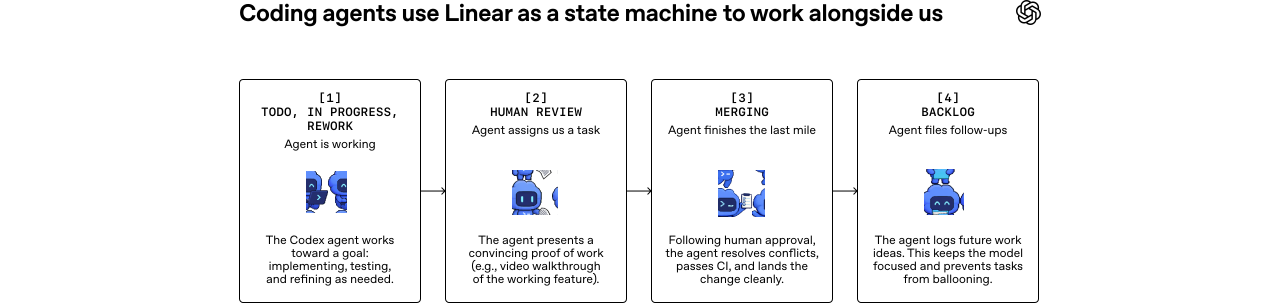
На практике Symphony отделяет работу от сессий и пулл-реквестов. Некоторые задачи создают несколько PR в разных репозиториях; другие представляют собой чистое исследование или анализ, которые вообще не затрагивают кодовую базу.
Как только работа абстрагируется подобным образом, тикеты могут представлять собой гораздо более крупные объемы задач.
Мы регулярно используем Symphony для оркестрации сложных функций и миграций инфраструктуры. Например, мы можем завести задачу с просьбой к агенту проанализировать кодовую базу, Slack или Notion и составить план реализации. Когда нас устраивает план, агент генерирует дерево задач, разбивая работу на этапы и определяя зависимости между ними.
Агенты начинают работу только над теми задачами, которые не заблокированы, поэтому выполнение разворачивается естественно и оптимально параллельно для этого направленного ациклического графа (DAG — последовательности шагов выполнения). Например, мы отметили обновление React как заблокированное миграцией на Vite. Как и ожидалось, агенты начали обновлять React только после завершения миграции на Vite.
Агенты также могут самостоятельно создавать работу. Во время реализации или ревью они часто замечают улучшения, выходящие за рамки текущей задачи: проблему с производительностью, возможность рефакторинга или лучшую архитектуру. Когда это происходит, они просто создают новый тикет, который мы можем оценить и запланировать на потом — многие из таких последующих задач также подхватываются агентами. Хотя мы контролируем этот процесс, агенты остаются организованными и продвигают работу вперед.
Такой способ работы драматически снижает когнитивные затраты на запуск неоднозначных задач. Если агент делает что-то не так, это все равно полезная информация, а затраты для нас близки к нулю. Мы можем очень дешево заводить тикеты для прототипирования и исследований агентом и отбрасывать любые результаты, которые нам не нравятся.
Поскольку оркестратор работает на devbox’ах и никогда не спит, мы можем добавлять задачи откуда угодно и быть уверенными, что агент их подхватит. Например, один инженер из нашей команды сделал три значительных изменения из приложения Linear на своем телефоне, находясь в уютном домике с плохим Wi-Fi.
Рост числа исследовательских задач благодаря такому подходу
При наблюдении за результатами работы с Symphony самым очевидным изменением стал объем производительности. В некоторых командах OpenAI мы увидели увеличение числа принятых PR на 500% за первые три недели. Вне OpenAI основатель Linear Карри Сааринен отметил всплеск создания рабочих пространств после выпуска Symphony. Однако более глубокое изменение заключается в том, как команды думают о работе.
Когда наши инженеры больше не тратят время на управление сессиями Codex, экономика изменений кода полностью меняется. Воспринимаемая стоимость каждого изменения падает, потому что мы больше не вкладываем человеческие усилия в само руководство реализацией.
Это изменило наше поведение. Стало тривиальным запускать спекулятивные задачи в Symphony. Проверить идею, исследовать рефакторинг, протестировать гипотезу и сохранить только те результаты, которые выглядят многообещающе.
Это также расширяет круг лиц, способных инициировать работу. Наш продакт-менеджер и дизайнер теперь могут направлять запросы функций напрямую в Symphony. Им не нужно клонировать репозиторий или управлять сессией Codex. Они описывают функцию и получают обратно пакет для ревью, включающий видеообзор работающей функции внутри реального продукта.
Symphony также отлично проявляет себя в крупных монорепозиториях (вроде того, что у нас в OpenAI), где финальный этап слияния PR идет медленно и хрупко. Система следит за CI, выполняет rebase при необходимости, разрешает конфликты, перезапускает нестабильные тесты и в целом сопровождает изменения через конвейер. К моменту, когда тикет доходит до статуса Merging (Слияние), у нас есть полная уверенность, что изменение попадет в основную ветку без присмотра человека.
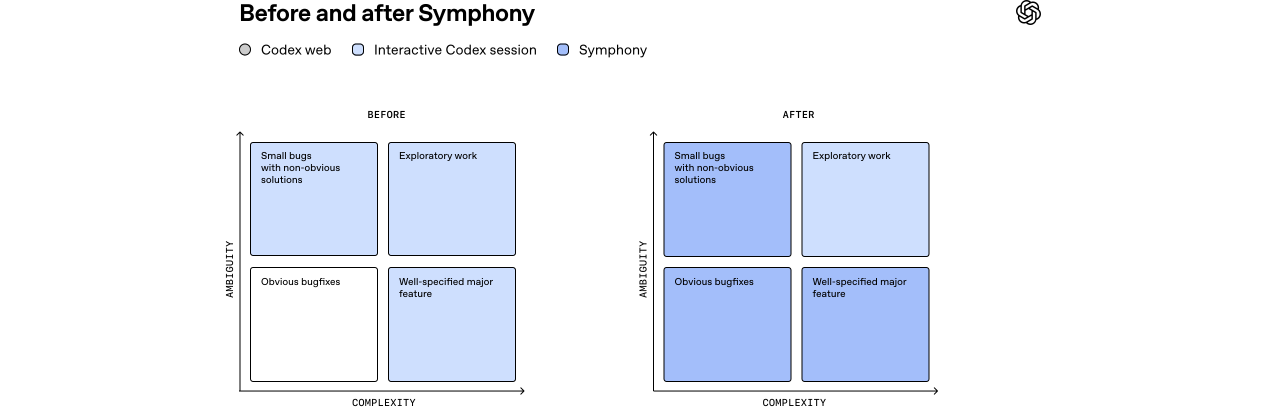
После внедрения Symphony мы делегируем агентам больше работы и фокусируемся на более сложных, исследовательских задачах.
Прогресс приносит новые иные проблемы
Работа на таком уровне сопряжена с компромиссами. Когда мы перешли от интерактивного управления агентами к назначению им работы на уровне тикетов, мы потеряли возможность постоянно подталкивать их в процессе и корректировать курс при необходимости. Иногда агент выдавал результат, который полностью мимо цели. Это было полезно — такие неудачи выявляли пробелы в системе и помогали сделать ее более надежной.
Вместо того чтобы исправлять результат вручную, мы добавили защитные механизмы и навыки, чтобы агенты могли преуспеть в следующий раз. Со временем это привело нас к добавлению новых возможностей в наш harness, таких как запуск сквозных тестов, управление приложением через Chrome DevTools и проведение дымовых QA-тестов. Мы значительно улучшили нашу документацию и прояснили, как выглядит качественный результат.
Не каждая задача подходит под стиль работы Symphony. Некоторые проблемы по-прежнему требуют от инженеров работы напрямую с интерактивными сессиями Codex, особенно неоднозначные задачи или работа, требующая серьезных суждений и экспертизы. На практике это обычно самые интересные и приятные для инженеров задачи, на которые они хотят тратить время.
Разница в том, что Symphony может справляться с основной частью рутинной работы по реализации. Это позволяет инженерам сосредоточиться на одной сложной проблеме за раз вместо постоянного переключения контекста между мелкими задачами.
Мы также усвоили, что относиться к агентам как к жестким узлам в машине состояний неэффективно. Модели становятся умнее и могут решать более крупные проблемы, чем те рамки, в которые мы пытаемся их втиснуть. Наши ранние версии агентской работы просили Codex лишь реализовать задачу. Этот подход оказался слишком ограниченным. Codex прекрасно справляется как с созданием нескольких PR, так и с чтением отзывов на ревью и их устранением. Поэтому мы дали ему инструменты — CLI gh, навыки чтения логов CI и т. д. — и теперь мы можем просить Codex делать больше, например закрывать старые PR или собирать отчеты по завершенной и заброшенной работе. Подобные типы задач выходили далеко за рамки первоначальных рамок реализации функций.
Поэтому в конечном итоге мы перешли к предоставлению агентам целей вместо жестких переходов, подобно тому, как хороший менеджер ставит задачу прямому подчиненному в своей команде. Сила моделей заключается в их способности рассуждать, поэтому дайте им инструменты и контекст и позвольте им творить.
Использование Symphony для создания Symphony
Когда вы открываете репозиторий Symphony, первое, что вы заметите — технически Symphony представляет собой всего лишь файл SPEC.md с определением проблемы и предполагаемого решения. Вместо создания сложной системы надзора мы определили проблему и предполагаемые решения, предоставив агентам высокоуровневое управление.
Markdown
1# Symphony Service Specification2
3Status: Draft v1 (language-agnostic)4
5Purpose: Define a service that orchestrates coding agents to get project work done.6
7## 1. Problem Statement8
9Symphony is a long-running automation service that continuously reads work from an issue tracker10(Linear in this specification version), creates an isolated workspace for each issue, and runs a11coding agent session for that issue inside the workspace.12
13The service solves four operational problems:14
15- It turns issue execution into a repeatable daemon workflow instead of manual scripts.16- It isolates agent execution in per-issue workspaces so agent commands run only inside per-issue17 workspace directories.18- It keeps the workflow policy in-repo (`WORKFLOW.md`) so teams version the agent prompt and runtime19 settings with their code.20- It provides enough observability to operate and debug multiple concurrent agent runs.21
22Implementations are expected to document their trust and safety posture explicitly. This23specification does not require a single approval, sandbox, or operator-confirmation policy; some24implementations may target trusted environments with a high-trust configuration, while others may25require stricter approvals or sandboxing.26
27Important boundary:28
29- Symphony is a scheduler/runner and tracker reader.30- Ticket writes (state transitions, comments, PR links) are typically performed by the coding agent31 using tools available in the workflow/runtime environment.32- A successful run may end at a workflow-defined handoff state (for example `Human Review`), not33 necessarily `Done`.34
35## 2. Goals and Non-Goals36
37### 2.1 Goals38
39- Poll the issue tracker on a fixed cadence and dispatch work with bounded concurrency.40- Maintain a single authoritative orchestrator state for dispatch, retries, and reconciliation.41- Create deterministic per-issue workspaces and preserve them across runs.42- Stop active runs when issue state changes make them ineligible.43- Recover from transient failures with exponential backoff.44- Load runtime behavior from a repository-owned `WORKFLOW.md` contract.45- Expose operator-visible observability (at minimum structured logs).46- Support restart recovery without requiring a persistent database.47
48### 2.2 Non-Goals49
50- Rich web UI or multi-tenant control plane.51- Prescribing a specific dashboard or terminal UI implementation.52- General-purpose workflow engine or distributed job scheduler.53- Built-in business logic for how to edit tickets, PRs, or comments. (That logic lives in the54 workflow prompt and agent tooling.)55- Mandating strong sandbox controls beyond what the coding agent and host OS provide.56- Mandating a single default approval, sandbox, or operator-confirmation posture for all57 implementations.58
59## 3. System Overview60
61### 3.1 Main Components62
631. `Workflow Loader`64 - Reads `WORKFLOW.md`.65 - Parses YAML front matter and prompt body.66 - Returns `{config, prompt_template}`.67
682. `Config Layer`69 - Exposes typed getters for workflow config values.70 - Applies defaults and environment variable indirection.71 - Performs validation used by the orchestrator before dispatch.72
733. `Issue Tracker Client`74 - Fetches candidate issues in active states.75 - Fetches current states for specific issue IDs (reconciliation).76 - Fetches terminal-state issues during startup cleanup.77 - Normalizes tracker payloads into a stable issue model.78
794. `Orchestrator`80 - Owns the poll tick.81 - Owns the in-memory runtime state.82 - Decides which issues to dispatch, retry, stop, or release.83 - Tracks session metrics and retry queue state.84
855. `Workspace Manager`86 - Maps issue identifiers to workspace paths.87 - Ensures per-issue workspace directories exist.88 - Runs workspace lifecycle hooks.89 - Cleans workspaces for terminal issues.90
916. `Agent Runner`92 - Creates workspace.93 - Builds prompt from issue + workflow template.94 - Launches the coding agent app-server client.95 - Streams agent updates back to the orchestrator.96
977. `Status Surface` (optional)98 - Presents human-readable runtime status (for example terminal output, dashboard, or other99 operator-facing view).1001018. `Logging`102 - Emits structured runtime logs to one or more configured sinks.103
104### 3.2 Abstraction Levels105
106Symphony is easiest to port when kept in these layers:107
1081. `Policy Layer` (repo-defined)109 - `WORKFLOW.md` prompt body.110 - Team-specific rules for ticket handling, validation, and handoff.111
1122. `Configuration Layer` (typed getters)113 - Parses front matter into typed runtime settings.114 - Handles defaults, environment tokens, and path normalization.115
1163. `Coordination Layer` (orchestrator)117 - Polling loop, issue eligibility, concurrency, retries, reconciliation.118
1194. `Execution Layer` (workspace + agent subprocess)120 - Filesystem lifecycle, workspace preparation, coding-agent protocol.121
1225. `Integration Layer` (Linear adapter)123 - API calls and normalization for tracker data.124
1256. `Observability Layer` (logs + optional status surface)126 - Operator visibility into orchestrator and agent behavior.127
128### 3.3 External Dependencies129
130- Issue tracker API (Linear for `tracker.kind: linear` in this specification version).131- Local filesystem for workspaces and logs.132- Optional workspace population tooling (for example Git CLI, if used).133- Coding-agent executable that supports JSON-RPC-like app-server mode over stdio.134- Host environment authentication for the issue tracker and coding agent.135
136## 4. Core Domain Model137
138### 4.1 Entities139
140#### 4.1.1 Issue141
142Normalized issue record used by orchestration, prompt rendering, and observability output.143
144Fields:145
146- `id` (string)147 - Stable tracker-internal ID.148- `identifier` (string)149 - Human-readable ticket key (example: `ABC-123`).150- `title` (string)151- `description` (string or null)152- `priority` (integer or null)153 - Lower numbers are higher priority in dispatch sorting.154- `state` (string)155 - Current tracker state name.156- `branch_name` (string or null)157 - Tracker-provided branch metadata if available.158- `url` (string or null)159- `labels` (list of strings)160 - Normalized to lowercase.161- `blocked_by` (list of blocker refs)162 - Each blocker ref contains:163 - `id` (string or null)164 - `identifier` (string or null)165 - `state` (string or null)166- `created_at` (timestamp or null)167- `updated_at` (timestamp or null)168
169#### 4.1.2 Workflow Definition170
171Parsed `WORKFLOW.md` payload:172
173- `config` (map)174 - YAML front matter root object.175- `prompt_template` (string)176 - Markdown body after front matter, trimmed.177
178#### 4.1.3 Service Config (Typed View)179
180Typed runtime values derived from `WorkflowDefinition.config` plus environment resolution.181
182Examples:183
184- poll interval185- workspace root186- active and terminal issue states187- concurrency limits188- coding-agent executable/args/timeouts189- workspace hooks190
191#### 4.1.4 Workspace192
193Filesystem workspace assigned to one issue identifier.194
195Fields (logical):196
197- `path` (workspace path; current runtime typically uses absolute paths, but relative roots are198 possible if configured without path separators)199- `workspace_key` (sanitized issue identifier)200- `created_now` (boolean, used to gate `after_create` hook)201
202#### 4.1.5 Run Attempt203
204One execution attempt for one issue.205
206Fields (logical):207
208- `issue_id`209- `issue_identifier`210- `attempt` (integer or null, `null` for first run, `>=1` for retries/continuation)211- `workspace_path`212- `started_at`213- `status`214- `error` (optional)215
216#### 4.1.6 Live Session (Agent Session Metadata)217
218State tracked while a coding-agent subprocess is running.219
220Fields:221
222- `session_id` (string, `-`)223- `thread_id` (string)224- `turn_id` (string)225- `codex_app_server_pid` (string or null)226- `last_codex_event` (string/enum or null)227- `last_codex_timestamp` (timestamp or null)228- `last_codex_message` (summarized payload)229- `codex_input_tokens` (integer)230- `codex_output_tokens` (integer)231- `codex_total_tokens` (integer)232- `last_reported_input_tokens` (integer)233- `last_reported_output_tokens` (integer)234- `last_reported_total_tokens` (integer)235- `turn_count` (integer)236 - Number of coding-agent turns started within the current worker lifetime.237
238#### 4.1.7 Retry Entry239
240Scheduled retry state for an issue.241
242Fields:243
244- `issue_id`245- `identifier` (best-effort human ID for status surfaces/logs)246- `attempt` (integer, 1-based for retry queue)247- `due_at_ms` (monotonic clock timestamp)248- `timer_handle` (runtime-specific timer reference)249- `error` (string or null)250
251#### 4.1.8 Orchestrator Runtime State252
253Single authoritative in-memory state owned by the orchestrator.254
255Fields:256
257- `poll_interval_ms` (current effective poll interval)258- `max_concurrent_agents` (current effective global concurrency limit)259- `running` (map `issue_id -> running entry`)260- `claimed` (set of issue IDs reserved/running/retrying)261- `retry_attempts` (map `issue_id -> RetryEntry`)262- `completed` (set of issue IDs; bookkeeping only, not dispatch gating)263- `codex_totals` (aggregate tokens + runtime seconds)264- `codex_rate_limits` (latest rate-limit snapshot from agent events)265
266### 4.2 Stable Identifiers and Normalization Rules267
268- `Issue ID`269 - Use for tracker lookups and internal map keys.270- `Issue Identifier`271 - Use for human-readable logs and workspace naming.272- `Workspace Key`273 - Derive from `issue.identifier` by replacing any character not in `[A-Za-z0-9._-]` with `_`.274 - Use the sanitized value for the workspace directory name.275- `Normalized Issue State`276 - Compare states after `lowercase`.277- `Session ID`278 - Compose from coding-agent `thread_id` and `turn_id` as `-`.279
280## 5. Workflow Specification (Repository Contract)281
282### 5.1 File Discovery and Path Resolution283
284Workflow file path precedence:285
2861. Explicit application/runtime setting (set by CLI startup path).2872. Default: `WORKFLOW.md` in the current process working directory.288
289Loader behavior:290
291- If the file cannot be read, return `missing_workflow_file` error.292- The workflow file is expected to be repository-owned and version-controlled.293
294### 5.2 File Format295
296`WORKFLOW.md` is a Markdown file with optional YAML front matter.297
298Design note:299
300- `WORKFLOW.md` should be self-contained enough to describe and run different workflows (prompt,301 runtime settings, hooks, and tracker selection/config) without requiring out-of-band302 service-specific configuration.303
304Parsing rules:305
306- If file starts with `---`, parse lines until the next `---` as YAML front matter.307- Remaining lines become the prompt body.308- If front matter is absent, treat the entire file as prompt body and use an empty config map.309- YAML front matter must decode to a map/object; non-map YAML is an error.310- Prompt body is trimmed before use.311
312Returned workflow object:313
314- `config`: front matter root object (not nested under a `config` key).315- `prompt_template`: trimmed Markdown body.316
317### 5.3 Front Matter Schema318
319Top-level keys:320
321- `tracker`322- `polling`323- `workspace`324- `hooks`325- `agent`326- `codex`327
328Unknown keys should be ignored for forward compatibility.329
330Note:331
332- The workflow front matter is extensible. Optional extensions may define additional top-level keys333 (for example `server`) without changing the core schema above.334- Extensions should document their field schema, defaults, validation rules, and whether changes335 apply dynamically or require restart.336- Common extension: `server.port` (integer) enables the optional HTTP server described in Section337 13.7.338
339#### 5.3.1 `tracker` (object)340
341Fields:342
343- `kind` (string)344 - Required for dispatch.345 - Current supported value: `linear`346- `endpoint` (string)347 - Default for `tracker.kind == "linear"`: `https://api.linear.app/graphql`348- `api_key` (string)349 - May be a literal token or `$VAR_NAME`.350 - Canonical environment variable for `tracker.kind == "linear"`: `LINEAR_API_KEY`.351 - If `$VAR_NAME` resolves to an empty string, treat the key as missing.352- `project_slug` (string)353 - Required for dispatch when `tracker.kind == "linear"`.354- `active_states` (list of strings)355 - Default: `Todo`, `In Progress`356- `terminal_states` (list of strings)357 - Default: `Closed`, `Cancelled`, `Canceled`, `Duplicate`, `Done`358
359#### 5.3.2 `polling` (object)360
361Fields:362
363- `interval_ms` (integer or string integer)364 - Default: `30000`365 - Changes should be re-applied at runtime and affect future tick scheduling without restart.366
367#### 5.3.3 `workspace` (object)368
369Fields:370
371- `root` (path string or `$VAR`)372 - Default: `/symphony_workspaces`373 - `~` and strings containing path separators are expanded.374 - Bare strings without path separators are preserved as-is (relative roots are allowed but375 discouraged).376377#### 5.3.4 `hooks` (object)378
379Fields:380
381- `after_create` (multiline shell script string, optional)382 - Runs only when a workspace directory is newly created.383 - Failure aborts workspace creation.384- `before_run` (multiline shell script string, optional)385 - Runs before each agent attempt after workspace preparation and before launching the coding386 agent.387 - Failure aborts the current attempt.388- `after_run` (multiline shell script string, optional)389 - Runs after each agent attempt (success, failure, timeout, or cancellation) once the workspace390 exists.391 - Failure is logged but ignored.392- `before_remove` (multiline shell script string, optional)393 - Runs before workspace deletion if the directory exists.394 - Failure is logged but ignored; cleanup still proceeds.395- `timeout_ms` (integer, optional)396 - Default: `60000`397 - Applies to all workspace hooks.398 - Non-positive values should be treated as invalid and fall back to the default.399 - Changes should be re-applied at runtime for future hook executions.400401#### 5.3.5 `agent` (object)402
403Fields:404
405- `max_concurrent_agents` (integer or string integer)406 - Default: `10`407 - Changes should be re-applied at runtime and affect subsequent dispatch decisions.408- `max_retry_backoff_ms` (integer or string integer)409 - Default: `300000` (5 minutes)410 - Changes should be re-applied at runtime and affect future retry scheduling.411- `max_concurrent_agents_by_state` (map `state_name -> positive integer`)412 - Default: empty map.413 - State keys are normalized (`lowercase`) for lookup.414 - Invalid entries (non-positive or non-numeric) are ignored.415
416#### 5.3.6 `codex` (object)417
418Fields:419
420For Codex-owned config values such as `approval_policy`, `thread_sandbox`, and421`turn_sandbox_policy`, supported values are defined by the targeted Codex app-server version.422Implementors should treat them as pass-through Codex config values rather than relying on a423hand-maintained enum in this spec. To inspect the installed Codex schema, run424`codex app-server generate-json-schema --out ` and inspect the relevant definitions referenced425by `v2/ThreadStartParams.json` and `v2/TurnStartParams.json`. Implementations may validate these426fields locally if they want stricter startup checks.427
428- `command` (string shell command)429 - Default: `codex app-server`430 - The runtime launches this command via `bash -lc` in the workspace directory.431 - The launched process must speak a compatible app-server protocol over stdio.432- `approval_policy` (Codex `AskForApproval` value)433 - Default: implementation-defined.434- `thread_sandbox` (Codex `SandboxMode` value)435 - Default: implementation-defined.436- `turn_sandbox_policy` (Codex `SandboxPolicy` value)437 - Default: implementation-defined.438- `turn_timeout_ms` (integer)439 - Default: `3600000` (1 hour)440- `read_timeout_ms` (integer)441 - Default: `5000`442- `stall_timeout_ms` (integer)443 - Default: `300000` (5 minutes)444 - If `<= 0`, stall detection is disabled.445
446### 5.4 Prompt Template Contract447
448The Markdown body of `WORKFLOW.md` is the per-issue prompt template.449
450Rendering requirements:451
452- Use a strict template engine (Liquid-compatible semantics are sufficient).453- Unknown variables must fail rendering.454- Unknown filters must fail rendering.455
456Template input variables:457
458- `issue` (object)459 - Includes all normalized issue fields, including labels and blockers.460- `attempt` (integer or null)461 - `null`/absent on first attempt.462 - Integer on retry or continuation run.463
464Fallback prompt behavior:465
466- If the workflow prompt body is empty, the runtime may use a minimal default prompt467 (`You are working on an issue from Linear.`).468- Workflow file read/parse failures are configuration/validation errors and should not silently fall469 back to a prompt.470
471### 5.5 Workflow Validation and Error Surface472
473Error classes:474
475- `missing_workflow_file`476- `workflow_parse_error`477- `workflow_front_matter_not_a_map`478- `template_parse_error` (during prompt rendering)479- `template_render_error` (unknown variable/filter, invalid interpolation)480
481Dispatch gating behavior:482
483- Workflow file read/YAML errors block new dispatches until fixed.484- Template errors fail only the affected run attempt.485
486## 6. Configuration Specification487
488### 6.1 Source Precedence and Resolution Semantics489
490Configuration precedence:491
4921. Workflow file path selection (runtime setting -> cwd default).4932. YAML front matter values.4943. Environment indirection via `$VAR_NAME` inside selected YAML values.4954. Built-in defaults.496
497Value coercion semantics:498
499- Path/command fields support:500 - `~` home expansion501 - `$VAR` expansion for env-backed path values502 - Apply expansion only to values intended to be local filesystem paths; do not rewrite URIs or503 arbitrary shell command strings.504505### 6.2 Dynamic Reload Semantics506
507Dynamic reload is required:508
509- The software should watch `WORKFLOW.md` for changes.510- On change, it should re-read and re-apply workflow config and prompt template without restart.511- The software should attempt to adjust live behavior to the new config (for example polling512 cadence, concurrency limits, active/terminal states, codex settings, workspace paths/hooks, and513 prompt content for future runs).514- Reloaded config applies to future dispatch, retry scheduling, reconciliation decisions, hook515 execution, and agent launches.516- Implementations are not required to restart in-flight agent sessions automatically when config517 changes.518- Extensions that manage their own listeners/resources (for example an HTTP server port change) may519 require restart unless the implementation explicitly supports live rebind.520- Implementations should also re-validate/reload defensively during runtime operations (for example521 before dispatch) in case filesystem watch events are missed.522- Invalid reloads should not crash the service; keep operating with the last known good effective523 configuration and emit an operator-visible error.524
525### 6.3 Dispatch Preflight Validation526
527This validation is a scheduler preflight run before attempting to dispatch new work. It validates528the workflow/config needed to poll and launch workers, not a full audit of all possible workflow529behavior.530
531Startup validation:532
533- Validate configuration before starting the scheduling loop.534- If startup validation fails, fail startup and emit an operator-visible error.535
536Per-tick dispatch validation:537
538- Re-validate before each dispatch cycle.539- If validation fails, skip dispatch for that tick, keep reconciliation active, and emit an540 operator-visible error.541
542Validation checks:543
544- Workflow file can be loaded and parsed.545- `tracker.kind` is present and supported.546- `tracker.api_key` is present after `$` resolution.547- `tracker.project_slug` is present when required by the selected tracker kind.548- `codex.command` is present and non-empty.549
550### 6.4 Config Fields Summary (Cheat Sheet)551
552This section is intentionally redundant so a coding agent can implement the config layer quickly.553
554- `tracker.kind`: string, required, currently `linear`555- `tracker.endpoint`: string, default `https://api.linear.app/graphql` when `tracker.kind=linear`556- `tracker.api_key`: string or `$VAR`, canonical env `LINEAR_API_KEY` when `tracker.kind=linear`557- `tracker.project_slug`: string, required when `tracker.kind=linear`558- `tracker.active_states`: list of strings, default `["Todo", "In Progress"]`559- `tracker.terminal_states`: list of strings, default `["Closed", "Cancelled", "Canceled", "Duplicate", "Done"]`560- `polling.interval_ms`: integer, default `30000`561- `workspace.root`: path, default `/symphony_workspaces`562- `worker.ssh_hosts` (extension): list of SSH host strings, optional; when omitted, work runs563 locally564- `worker.max_concurrent_agents_per_host` (extension): positive integer, optional; shared per-host565 cap applied across configured SSH hosts566- `hooks.after_create`: shell script or null567- `hooks.before_run`: shell script or null568- `hooks.after_run`: shell script or null569- `hooks.before_remove`: shell script or null570- `hooks.timeout_ms`: integer, default `60000`571- `agent.max_concurrent_agents`: integer, default `10`572- `agent.max_turns`: integer, default `20`573- `agent.max_retry_backoff_ms`: integer, default `300000` (5m)574- `agent.max_concurrent_agents_by_state`: map of positive integers, default `{}`575- `codex.command`: shell command string, default `codex app-server`576- `codex.approval_policy`: Codex `AskForApproval` value, default implementation-defined577- `codex.thread_sandbox`: Codex `SandboxMode` value, default implementation-defined578- `codex.turn_sandbox_policy`: Codex `SandboxPolicy` value, default implementation-defined579- `codex.turn_timeout_ms`: integer, default `3600000`580- `codex.read_timeout_ms`: integer, default `5000`581- `codex.stall_timeout_ms`: integer, default `300000`582- `server.port` (extension): integer, optional; enables the optional HTTP server, `0` may be used583 for ephemeral local bind, and CLI `--port` overrides it584
585## 7. Orchestration State Machine586
587The orchestrator is the only component that mutates scheduling state. All worker outcomes are588reported back to it and converted into explicit state transitions.589
590### 7.1 Issue Orchestration States591
592This is not the same as tracker states (`Todo`, `In Progress`, etc.). This is the service's internal593claim state.594
5951. `Unclaimed`596 - Issue is not running and has no retry scheduled.597
5982. `Claimed`599 - Orchestrator has reserved the issue to prevent duplicate dispatch.600 - In practice, claimed issues are either `Running` or `RetryQueued`.601
6023. `Running`603 - Worker task exists and the issue is tracked in `running` map.604
6054. `RetryQueued`606 - Worker is not running, but a retry timer exists in `retry_attempts`.607
6085. `Released`609 - Claim removed because issue is terminal, non-active, missing, or retry path completed without610 re-dispatch.611612Important nuance:613
614- A successful worker exit does not mean the issue is done forever.615- The worker may continue through multiple back-to-back coding-agent turns before it exits.616- After each normal turn completion, the worker re-checks the tracker issue state.617- If the issue is still in an active state, the worker should start another turn on the same live618 coding-agent thread in the same workspace, up to `agent.max_turns`.619- The first turn should use the full rendered task prompt.620- Continuation turns should send only continuation guidance to the existing thread, not resend the621 original task prompt that is already present in thread history.622- Once the worker exits normally, the orchestrator still schedules a short continuation retry623 (about 1 second) so it can re-check whether the issue remains active and needs another worker624 session.625
626### 7.2 Run Attempt Lifecycle627
628A run attempt transitions through these phases:629
6301. `PreparingWorkspace`6312. `BuildingPrompt`6323. `LaunchingAgentProcess`6334. `InitializingSession`6345. `StreamingTurn`6356. `Finishing`6367. `Succeeded`6378. `Failed`6389. `TimedOut`63910. `Stalled`64011. `CanceledByReconciliation`641
642Distinct terminal reasons are important because retry logic and logs differ.643
644### 7.3 Transition Triggers645
646- `Poll Tick`647 - Reconcile active runs.648 - Validate config.649 - Fetch candidate issues.650 - Dispatch until slots are exhausted.651
652- `Worker Exit (normal)`653 - Remove running entry.654 - Update aggregate runtime totals.655 - Schedule continuation retry (attempt `1`) after the worker exhausts or finishes its in-process656 turn loop.657658- `Worker Exit (abnormal)`659 - Remove running entry.660 - Update aggregate runtime totals.661 - Schedule exponential-backoff retry.662
663- `Codex Update Event`664 - Update live session fields, token counters, and rate limits.665
666- `Retry Timer Fired`667 - Re-fetch active candidates and attempt re-dispatch, or release claim if no longer eligible.668
669- `Reconciliation State Refresh`670 - Stop runs whose issue states are terminal or no longer active.671
672- `Stall Timeout`673 - Kill worker and schedule retry.674
675### 7.4 Idempotency and Recovery Rules676
677- The orchestrator serializes state mutations through one authority to avoid duplicate dispatch.678- `claimed` and `running` checks are required before launching any worker.679- Reconciliation runs before dispatch on every tick.680- Restart recovery is tracker-driven and filesystem-driven (no durable orchestrator DB required).681- Startup terminal cleanup removes stale workspaces for issues already in terminal states.682
683## 8. Polling, Scheduling, and Reconciliation684
685### 8.1 Poll Loop686
687At startup, the service validates config, performs startup cleanup, schedules an immediate tick, and688then repeats every `polling.interval_ms`.689
690The effective poll interval should be updated when workflow config changes are re-applied.691
692Tick sequence:693
6941. Reconcile running issues.6952. Run dispatch preflight validation.6963. Fetch candidate issues from tracker using active states.6974. Sort issues by dispatch priority.6985. Dispatch eligible issues while slots remain.6996. Notify observability/status consumers of state changes.700
701If per-tick validation fails, dispatch is skipped for that tick, but reconciliation still happens702first.703
704### 8.2 Candidate Selection Rules705
706An issue is dispatch-eligible only if all are true:707
708- It has `id`, `identifier`, `title`, and `state`.709- Its state is in `active_states` and not in `terminal_states`.710- It is not already in `running`.711- It is not already in `claimed`.712- Global concurrency slots are available.713- Per-state concurrency slots are available.714- Blocker rule for `Todo` state passes:715 - If the issue state is `Todo`, do not dispatch when any blocker is non-terminal.716
717Sorting order (stable intent):718
7191. `priority` ascending (1..4 are preferred; null/unknown sorts last)7202. `created_at` oldest first7213. `identifier` lexicographic tie-breaker722
723### 8.3 Concurrency Control724
725Global limit:726
727- `available_slots = max(max_concurrent_agents - running_count, 0)`728
729Per-state limit:730
731- `max_concurrent_agents_by_state[state]` if present (state key normalized)732- otherwise fallback to global limit733
734The runtime counts issues by their current tracked state in the `running` map.735
736Optional SSH host limit:737
738- When `worker.max_concurrent_agents_per_host` is set, each configured SSH host may run at most739 that many concurrent agents at once.740- Hosts at that cap are skipped for new dispatch until capacity frees up.741
742### 8.4 Retry and Backoff743
744Retry entry creation:745
746- Cancel any existing retry timer for the same issue.747- Store `attempt`, `identifier`, `error`, `due_at_ms`, and new timer handle.748
749Backoff formula:750
751- Normal continuation retries after a clean worker exit use a short fixed delay of `1000` ms.752- Failure-driven retries use `delay = min(10000 * 2^(attempt - 1), agent.max_retry_backoff_ms)`.753- Power is capped by the configured max retry backoff (default `300000` / 5m).754
755Retry handling behavior:756
7571. Fetch active candidate issues (not all issues).7582. Find the specific issue by `issue_id`.7593. If not found, release claim.7604. If found and still candidate-eligible:761 - Dispatch if slots are available.762 - Otherwise requeue with error `no available orchestrator slots`.7635. If found but no longer active, release claim.764
765Note:766
767- Terminal-state workspace cleanup is handled by startup cleanup and active-run reconciliation768 (including terminal transitions for currently running issues).769- Retry handling mainly operates on active candidates and releases claims when the issue is absent,770 rather than performing terminal cleanup itself.771
772### 8.5 Active Run Reconciliation773
774Reconciliation runs every tick and has two parts.775
776Part A: Stall detection777
778- For each running issue, compute `elapsed_ms` since:779 - `last_codex_timestamp` if any event has been seen, else780 - `started_at`781- If `elapsed_ms > codex.stall_timeout_ms`, terminate the worker and queue a retry.782- If `stall_timeout_ms <= 0`, skip stall detection entirely.783
784Part B: Tracker state refresh785
786- Fetch current issue states for all running issue IDs.787- For each running issue:788 - If tracker state is terminal: terminate worker and clean workspace.789 - If tracker state is still active: update the in-memory issue snapshot.790 - If tracker state is neither active nor terminal: terminate worker without workspace cleanup.791- If state refresh fails, keep workers running and try again on the next tick.792
793### 8.6 Startup Terminal Workspace Cleanup794
795When the service starts:796
7971. Query tracker for issues in terminal states.7982. For each returned issue identifier, remove the corresponding workspace directory.7993. If the terminal-issues fetch fails, log a warning and continue startup.800
801This prevents stale terminal workspaces from accumulating after restarts.802
803## 9. Workspace Management and Safety804
805### 9.1 Workspace Layout806
807Workspace root:808
809- `workspace.root` (normalized path; the current config layer expands path-like values and preserves810 bare relative names)811
812Per-issue workspace path:813
814- `/`815
816Workspace persistence:817
818- Workspaces are reused across runs for the same issue.819- Successful runs do not auto-delete workspaces.820
821### 9.2 Workspace Creation and Reuse822
823Input: `issue.identifier`824
825Algorithm summary:826
8271. Sanitize identifier to `workspace_key`.8282. Compute workspace path under workspace root.8293. Ensure the workspace path exists as a directory.8304. Mark `created_now=true` only if the directory was created during this call; otherwise831 `created_now=false`.8325. If `created_now=true`, run `after_create` hook if configured.833
834Notes:835
836- This section does not assume any specific repository/VCS workflow.837- Workspace preparation beyond directory creation (for example dependency bootstrap, checkout/sync,838 code generation) is implementation-defined and is typically handled via hooks.839
840### 9.3 Optional Workspace Population (Implementation-Defined)841
842The spec does not require any built-in VCS or repository bootstrap behavior.843
844Implementations may populate or synchronize the workspace using implementation-defined logic and/or845hooks (for example `after_create` and/or `before_run`).846
847Failure handling:848
849- Workspace population/synchronization failures return an error for the current attempt.850- If failure happens while creating a brand-new workspace, implementations may remove the partially851 prepared directory.852- Reused workspaces should not be destructively reset on population failure unless that policy is853 explicitly chosen and documented.854
855### 9.4 Workspace Hooks856
857Supported hooks:858
859- `hooks.after_create`860- `hooks.before_run`861- `hooks.after_run`862- `hooks.before_remove`863
864Execution contract:865
866- Execute in a local shell context appropriate to the host OS, with the workspace directory as867 `cwd`.868- On POSIX systems, `sh -lc (or a stricter equivalent such as `bash -lc ) is a869 conforming default.870- Hook timeout uses `hooks.timeout_ms`; default: `60000 ms`.871- Log hook start, failures, and timeouts.872
873Failure semantics:874
875- `after_create` failure or timeout is fatal to workspace creation.876- `before_run` failure or timeout is fatal to the current run attempt.877- `after_run` failure or timeout is logged and ignored.878- `before_remove` failure or timeout is logged and ignored.879
880### 9.5 Safety Invariants881
882This is the most important portability constraint.883
884Invariant 1: Run the coding agent only in the per-issue workspace path.885
886- Before launching the coding-agent subprocess, validate:887 - `cwd == workspace_path`888
889Invariant 2: Workspace path must stay inside workspace root.890
891- Normalize both paths to absolute.892- Require `workspace_path` to have `workspace_root` as a prefix directory.893- Reject any path outside the workspace root.894
895Invariant 3: Workspace key is sanitized.896
897- Only `[A-Za-z0-9._-]` allowed in workspace directory names.898- Replace all other characters with `_`.899
900## 10. Agent Runner Protocol (Coding Agent Integration)901
902This section defines the language-neutral contract for integrating a coding agent app-server.903
904Compatibility profile:905
906- The normative contract is message ordering, required behaviors, and the logical fields that must907 be extracted (for example session IDs, completion state, approval handling, and usage/rate-limit908 telemetry).909- Exact JSON field names may vary slightly across compatible app-server versions.910- Implementations should tolerate equivalent payload shapes when they carry the same logical911 meaning, especially for nested IDs, approval requests, user-input-required signals, and912 token/rate-limit metadata.913
914### 10.1 Launch Contract915
916Subprocess launch parameters:917
918- Command: `codex.command`919- Invocation: `bash -lc `920- Working directory: workspace path921- Stdout/stderr: separate streams922- Framing: line-delimited protocol messages on stdout (JSON-RPC-like JSON per line)923
924Notes:925
926- The default command is `codex app-server`.927- Approval policy, cwd, and prompt are expressed in the protocol messages in Section 10.2.928
929Recommended additional process settings:930
931- Max line size: 10 MB (for safe buffering)932
933### 10.2 Session Startup Handshake934
935Reference: https://developers.openai.com/codex/app-server/936
937The client must send these protocol messages in order:938
939Illustrative startup transcript (equivalent payload shapes are acceptable if they preserve the same940semantics):941
942```json943{"id":1,"method":"initialize","params":{"clientInfo":{"name":"symphony","version":"1.0"},"capabilities":{}}}944{"method":"initialized","params":{}}945{"id":2,"method":"thread/start","params":{"approvalPolicy":"","sandbox":"","cwd":"/abs/workspace"}}946{"id":3,"method":"turn/start","params":{"threadId":"","input":[{"type":"text","text":""}],"cwd":"/abs/workspace","title":"ABC-123: Example","approvalPolicy":"","sandboxPolicy":{"type":""}}}947```948
9491. `initialize` request950 - Params include:951 - `clientInfo` object (for example `{name, version}`)952 - `capabilities` object (may be empty)953 - If the targeted Codex app-server requires capability negotiation for dynamic tools, include the954 necessary capability flag(s) here.955 - Wait for response (`read_timeout_ms`)9562. `initialized` notification9573. `thread/start` request958 - Params include:959 - `approvalPolicy` = implementation-defined session approval policy value960 - `sandbox` = implementation-defined session sandbox value961 - `cwd` = absolute workspace path962 - If optional client-side tools are implemented, include their advertised tool specs using the963 protocol mechanism supported by the targeted Codex app-server version.9644. `turn/start` request965 - Params include:966 - `threadId`967 - `input` = single text item containing rendered prompt for the first turn, or continuation968 guidance for later turns on the same thread969 - `cwd`970 - `title` = `: `971 - `approvalPolicy` = implementation-defined turn approval policy value972 - `sandboxPolicy` = implementation-defined object-form sandbox policy payload when required by973 the targeted app-server version974975Session identifiers:976
977- Read `thread_id` from `thread/start` result `result.thread.id`978- Read `turn_id` from each `turn/start` result `result.turn.id`979- Emit `session_id = "-"`980- Reuse the same `thread_id` for all continuation turns inside one worker run981
982### 10.3 Streaming Turn Processing983
984The client reads line-delimited messages until the turn terminates.985
986Completion conditions:987
988- `turn/completed` -> success989- `turn/failed` -> failure990- `turn/cancelled` -> failure991- turn timeout (`turn_timeout_ms`) -> failure992- subprocess exit -> failure993
994Continuation processing:995
996- If the worker decides to continue after a successful turn, it should issue another `turn/start`997 on the same live `threadId`.998- The app-server subprocess should remain alive across those continuation turns and be stopped only999 when the worker run is ending.1000
1001Line handling requirements:1002
1003- Read protocol messages from stdout only.1004- Buffer partial stdout lines until newline arrives.1005- Attempt JSON parse on complete stdout lines.1006- Stderr is not part of the protocol stream:1007 - ignore it or log it as diagnostics1008 - do not attempt protocol JSON parsing on stderr1009
1010### 10.4 Emitted Runtime Events (Upstream to Orchestrator)1011
1012The app-server client emits structured events to the orchestrator callback. Each event should1013include:1014
1015- `event` (enum/string)1016- `timestamp` (UTC timestamp)1017- `codex_app_server_pid` (if available)1018- optional `usage` map (token counts)1019- payload fields as needed1020
1021Important emitted events may include:1022
1023- `session_started`1024- `startup_failed`1025- `turn_completed`1026- `turn_failed`1027- `turn_cancelled`1028- `turn_ended_with_error`1029- `turn_input_required`1030- `approval_auto_approved`1031- `unsupported_tool_call`1032- `notification`1033- `other_message`1034- `malformed`1035
1036### 10.5 Approval, Tool Calls, and User Input Policy1037
1038Approval, sandbox, and user-input behavior is implementation-defined.1039
1040Policy requirements:1041
1042- Each implementation should document its chosen approval, sandbox, and operator-confirmation1043 posture.1044- Approval requests and user-input-required events must not leave a run stalled indefinitely. An1045 implementation should either satisfy them, surface them to an operator, auto-resolve them, or1046 fail the run according to its documented policy.1047
1048Example high-trust behavior:1049
1050- Auto-approve command execution approvals for the session.1051- Auto-approve file-change approvals for the session.1052- Treat user-input-required turns as hard failure.1053
1054Unsupported dynamic tool calls:1055
1056- Supported dynamic tool calls that are explicitly implemented and advertised by the runtime should1057 be handled according to their extension contract.1058- If the agent requests a dynamic tool call (`item/tool/call`) that is not supported, return a tool1059 failure response and continue the session.1060- This prevents the session from stalling on unsupported tool execution paths.1061
1062Optional client-side tool extension:1063
1064- An implementation may expose a limited set of client-side tools to the app-server session.1065- Current optional standardized tool: `linear_graphql`.1066- If implemented, supported tools should be advertised to the app-server session during startup1067 using the protocol mechanism supported by the targeted Codex app-server version.1068- Unsupported tool names should still return a failure result and continue the session.1069
1070`linear_graphql` extension contract:1071
1072- Purpose: execute a raw GraphQL query or mutation against Linear using Symphony's configured1073 tracker auth for the current session.1074- Availability: only meaningful when `tracker.kind == "linear"` and valid Linear auth is configured.1075- Preferred input shape:1076
1077 ```json1078 {1079 "query": "single GraphQL query or mutation document",1080 "variables": {1081 "optional": "graphql variables object"1082 }1083 }1084 ```1085
1086- `query` must be a non-empty string.1087- `query` must contain exactly one GraphQL operation.1088- `variables` is optional and, when present, must be a JSON object.1089- Implementations may additionally accept a raw GraphQL query string as shorthand input.1090- Execute one GraphQL operation per tool call.1091- If the provided document contains multiple operations, reject the tool call as invalid input.1092- `operationName` selection is intentionally out of scope for this extension.1093- Reuse the configured Linear endpoint and auth from the active Symphony workflow/runtime config; do1094 not require the coding agent to read raw tokens from disk.1095- Tool result semantics:1096 - transport success + no top-level GraphQL `errors` -> `success=true`1097 - top-level GraphQL `errors` present -> `success=false`, but preserve the GraphQL response body1098 for debugging1099 - invalid input, missing auth, or transport failure -> `success=false` with an error payload1100- Return the GraphQL response or error payload as structured tool output that the model can inspect1101 in-session.11021103Illustrative responses (equivalent payload shapes are acceptable if they preserve the same outcome):1104
1105```json1106{"id":"","result":{"approved":true}}1107{"id":"","result":{"success":false,"error":"unsupported_tool_call"}}1108```1109
1110Hard failure on user input requirement:1111
1112- If the agent requests user input, fail the run attempt immediately.1113- The client detects this via:1114 - explicit method (`item/tool/requestUserInput`), or1115 - turn methods/flags indicating input is required.1116
1117### 10.6 Timeouts and Error Mapping1118
1119Timeouts:1120
1121- `codex.read_timeout_ms`: request/response timeout during startup and sync requests1122- `codex.turn_timeout_ms`: total turn stream timeout1123- `codex.stall_timeout_ms`: enforced by orchestrator based on event inactivity1124
1125Error mapping (recommended normalized categories):1126
1127- `codex_not_found`1128- `invalid_workspace_cwd`1129- `response_timeout`1130- `turn_timeout`1131- `port_exit`1132- `response_error`1133- `turn_failed`1134- `turn_cancelled`1135- `turn_input_required`1136
1137### 10.7 Agent Runner Contract1138
1139The `Agent Runner` wraps workspace + prompt + app-server client.1140
1141Behavior:1142
11431. Create/reuse workspace for issue.11442. Build prompt from workflow template.11453. Start app-server session.11464. Forward app-server events to orchestrator.11475. On any error, fail the worker attempt (the orchestrator will retry).1148
1149Note:1150
1151- Workspaces are intentionally preserved after successful runs.1152
1153## 11. Issue Tracker Integration Contract (Linear-Compatible)1154
1155### 11.1 Required Operations1156
1157An implementation must support these tracker adapter operations:1158
11591. `fetch_candidate_issues()`1160 - Return issues in configured active states for a configured project.1161
11622. `fetch_issues_by_states(state_names)`1163 - Used for startup terminal cleanup.1164
11653. `fetch_issue_states_by_ids(issue_ids)`1166 - Used for active-run reconciliation.1167
1168### 11.2 Query Semantics (Linear)1169
1170Linear-specific requirements for `tracker.kind == "linear"`:1171
1172- `tracker.kind == "linear"`1173- GraphQL endpoint (default `https://api.linear.app/graphql`)1174- Auth token sent in `Authorization` header1175- `tracker.project_slug` maps to Linear project `slugId`1176- Candidate issue query filters project using `project: { slugId: { eq: $projectSlug } }`1177- Issue-state refresh query uses GraphQL issue IDs with variable type `[ID!]`1178- Pagination required for candidate issues1179- Page size default: `50`1180- Network timeout: `30000 ms`1181
1182Important:1183
1184- Linear GraphQL schema details can drift. Keep query construction isolated and test the exact query1185 fields/types required by this specification.1186
1187A non-Linear implementation may change transport details, but the normalized outputs must match the1188domain model in Section 4.1189
1190### 11.3 Normalization Rules1191
1192Candidate issue normalization should produce fields listed in Section 4.1.1.1193
1194Additional normalization details:1195
1196- `labels` -> lowercase strings1197- `blocked_by` -> derived from inverse relations where relation type is `blocks`1198- `priority` -> integer only (non-integers become null)1199- `created_at` and `updated_at` -> parse ISO-8601 timestamps1200
1201### 11.4 Error Handling Contract1202
1203Recommended error categories:1204
1205- `unsupported_tracker_kind`1206- `missing_tracker_api_key`1207- `missing_tracker_project_slug`1208- `linear_api_request` (transport failures)1209- `linear_api_status` (non-200 HTTP)1210- `linear_graphql_errors`1211- `linear_unknown_payload`1212- `linear_missing_end_cursor` (pagination integrity error)1213
1214Orchestrator behavior on tracker errors:1215
1216- Candidate fetch failure: log and skip dispatch for this tick.1217- Running-state refresh failure: log and keep active workers running.1218- Startup terminal cleanup failure: log warning and continue startup.1219
1220### 11.5 Tracker Writes (Important Boundary)1221
1222Symphony does not require first-class tracker write APIs in the orchestrator.1223
1224- Ticket mutations (state transitions, comments, PR metadata) are typically handled by the coding1225 agent using tools defined by the workflow prompt.1226- The service remains a scheduler/runner and tracker reader.1227- Workflow-specific success often means "reached the next handoff state" (for example1228 `Human Review`) rather than tracker terminal state `Done`.1229- If the optional `linear_graphql` client-side tool extension is implemented, it is still part of1230 the agent toolchain rather than orchestrator business logic.1231
1232## 12. Prompt Construction and Context Assembly1233
1234### 12.1 Inputs1235
1236Inputs to prompt rendering:1237
1238- `workflow.prompt_template`1239- normalized `issue` object1240- optional `attempt` integer (retry/continuation metadata)1241
1242### 12.2 Rendering Rules1243
1244- Render with strict variable checking.1245- Render with strict filter checking.1246- Convert issue object keys to strings for template compatibility.1247- Preserve nested arrays/maps (labels, blockers) so templates can iterate.1248
1249### 12.3 Retry/Continuation Semantics1250
1251`attempt` should be passed to the template because the workflow prompt may provide different1252instructions for:1253
1254- first run (`attempt` null or absent)1255- continuation run after a successful prior session1256- retry after error/timeout/stall1257
1258### 12.4 Failure Semantics1259
1260If prompt rendering fails:1261
1262- Fail the run attempt immediately.1263- Let the orchestrator treat it like any other worker failure and decide retry behavior.1264
1265## 13. Logging, Status, and Observability1266
1267### 13.1 Logging Conventions1268
1269Required context fields for issue-related logs:1270
1271- `issue_id`1272- `issue_identifier`1273
1274Required context for coding-agent session lifecycle logs:1275
1276- `session_id`1277
1278Message formatting requirements:1279
1280- Use stable `key=value` phrasing.1281- Include action outcome (`completed`, `failed`, `retrying`, etc.).1282- Include concise failure reason when present.1283- Avoid logging large raw payloads unless necessary.1284
1285### 13.2 Logging Outputs and Sinks1286
1287The spec does not prescribe where logs must go (stderr, file, remote sink, etc.).1288
1289Requirements:1290
1291- Operators must be able to see startup/validation/dispatch failures without attaching a debugger.1292- Implementations may write to one or more sinks.1293- If a configured log sink fails, the service should continue running when possible and emit an1294 operator-visible warning through any remaining sink.1295
1296### 13.3 Runtime Snapshot / Monitoring Interface (Optional but Recommended)1297
1298If the implementation exposes a synchronous runtime snapshot (for dashboards or monitoring), it1299should return:1300
1301- `running` (list of running session rows)1302- each running row should include `turn_count`1303- `retrying` (list of retry queue rows)1304- `codex_totals`1305 - `input_tokens`1306 - `output_tokens`1307 - `total_tokens`1308 - `seconds_running` (aggregate runtime seconds as of snapshot time, including active sessions)1309- `rate_limits` (latest coding-agent rate limit payload, if available)1310
1311Recommended snapshot error modes:1312
1313- `timeout`1314- `unavailable`1315
1316### 13.4 Optional Human-Readable Status Surface1317
1318A human-readable status surface (terminal output, dashboard, etc.) is optional and1319implementation-defined.1320
1321If present, it should draw from orchestrator state/metrics only and must not be required for1322correctness.1323
1324### 13.5 Session Metrics and Token Accounting1325
1326Token accounting rules:1327
1328- Agent events may include token counts in multiple payload shapes.1329- Prefer absolute thread totals when available, such as:1330 - `thread/tokenUsage/updated` payloads1331 - `total_token_usage` within token-count wrapper events1332- Ignore delta-style payloads such as `last_token_usage` for dashboard/API totals.1333- Extract input/output/total token counts leniently from common field names within the selected1334 payload.1335- For absolute totals, track deltas relative to last reported totals to avoid double-counting.1336- Do not treat generic `usage` maps as cumulative totals unless the event type defines them that1337 way.1338- Accumulate aggregate totals in orchestrator state.1339
1340Runtime accounting:1341
1342- Runtime should be reported as a live aggregate at snapshot/render time.1343- Implementations may maintain a cumulative counter for ended sessions and add active-session1344 elapsed time derived from `running` entries (for example `started_at`) when producing a1345 snapshot/status view.1346- Add run duration seconds to the cumulative ended-session runtime when a session ends (normal exit1347 or cancellation/termination).1348- Continuous background ticking of runtime totals is not required.1349
1350Rate-limit tracking:1351
1352- Track the latest rate-limit payload seen in any agent update.1353- Any human-readable presentation of rate-limit data is implementation-defined.1354
1355### 13.6 Humanized Agent Event Summaries (Optional)1356
1357Humanized summaries of raw agent protocol events are optional.1358
1359If implemented:1360
1361- Treat them as observability-only output.1362- Do not make orchestrator logic depend on humanized strings.1363
Эталонная реализация написана на Elixir — ведь когда стоимость кода фактически равна нулю, вы наконец-то можете выбирать языки за их сильные стороны, такие как параллелизм в Elixir, —, но основная идея может быть выражена в виде простого документа Markdown. Мы рекомендуем вам поручить вашему любимому кодинг-агенту изучить эту спецификацию и реализовать собственную версию.
Первая версия Symphony представляла собой просто сеанс Codex, запущенный в tmux, который опрашивал Linear и порождал субагентов для новых задач. Это работало, но не отличалось особой надежностью. Вторая версия размещалась внутри основного репозитория нашего проекта, изначально созданного с расчетом на агентов. Мы уже создали обвязку (harness) для агентов, чтобы предоставить им навыки и контекст для качественной работы в этом репозитории, поэтому Symphony просто объединяет все это воедино.
Как только появилась базовая функциональность, мы использовали Symphony для создания самой Symphony.
Когда мы провели внутреннюю демонстрацию системы, управляющей задачами и прикрепляющей видео с подтверждением выполнения работы (proof-of-work), реакция была исключительно положительной: наш канал проекта Symphony разросся, и команды по всей организации начали использовать его органично. Внутреннее соответствие продукта рынку (product-market fit) является обязательным условием для внешнего запуска в OpenAI. Судя по уровню использования, который мы наблюдали в OpenAI, стало очевидно, что нам следует поделиться Symphony за пределами компании.
Поэтому мы выделили эту идею в самостоятельный SPEC.md и попросили Codex реализовать её. Для эталонной реализации мы выбрали Elixir — относительно нишевый язык с отличными примитивами для оркестрации и контроля параллельных процессов. Codex создал реализацию на Elixir с первой попытки, и с тех пор мы продолжали дорабатывать как спецификацию, так и саму реализацию. Чтобы отшлифовать спецификацию, мы даже попросили Codex реализовать её на нескольких других языках — TypeScript, Go, Rust, Java, Python — и использовать полученные результаты для выявления двусмысленностей и упрощения системы. Это удалось на каждом языке.
В процессе создания Symphony мы избавились от множества сопутствующих сложностей, таких как зависимости от конкретных репозиториев или Linear MCP. Symphony больше не зависит от наших внутренних репозиториев или рабочих процессов. Основной подход стал простым:
Для каждой открытой задачи гарантируйте, что агент работает в своем собственном рабочем пространстве.
Помимо помощи в непосредственной работе, рабочий процесс разработки теперь стал тем, что агенты знают и соблюдают. Рабочий процесс разработки — работа над тикетом, клонирование репозитория, перевод его в статус «в процессе» (in progress), чтобы продакт-менеджер знал, что над ним работают, создание PR, перевод в статус Review, прикрепление видео и т. д. — теперь описан в простом файле WORKFLOW.md. Всё это представляет собой процесс, которому следовали люди, но он никогда не был задокументирован. Вместо того чтобы полагаться на этот негласный набор шагов, мы теперь документируем его, а Symphony следит за тем, чтобы агенты следовали ему. Это позволяет нам создавать агентов, которые работают бок о бок с нами. Если мы решим, что агенты также должны прикреплять результаты самоанализа к завершенной работе, мы добавим это в WORKFLOW.md, и Symphony направит агентов к выполнению этого шага.
Нам также посчастливилось использовать Codex в режиме сервера приложений (app server mode) — встроенном безголовом (headless) режиме для Codex. Этот режим позволил нам запускать Codex и взаимодействовать с ним программно через хорошо документированный JSON-RPC API для таких задач, как запуск потока (thread) или реагирование на ходы. Это удобнее и масштабируемей, чем попытки взаимодействия с Codex через интерфейс командной строки (CLI) или живые сеансы tmux.
Codex App Server идеально подошел для нашего сценария использования: мы задействуем обвязку, предоставляемую Codex, имея при этом точки подключения и элементы управления (knobs and hooks). Например, чтобы избежать передачи токена доступа Linear субагентам, мы используем динамические вызовы инструментов для предоставления необработанной функции linear_graphql, которая выполняет произвольные запросы к Linear без использования MCP или предоставления токена доступа контейнерам.
Что дальше
Symphony — это намеренно минималистичный уровень оркестрации. Мы открываем его исходный код, чтобы продемонстрировать возможности Codex App Server в сочетании с различными инструментами управления рабочими процессами, такими как Linear. Поэтому мы не планируем поддерживать Symphony в качестве самостоятельного продукта. Воспринимайте его как эталонную реализацию. Подобно тому как многие разработчики направляли своих кодинг-агентов на публикацию по проектированию обвязки (harness engineering), чтобы настроить свои репозитории, мы надеемся, что вы направите своего любимого кодинг-агента на спецификацию и репозиторий Symphony, чтобы создать собственные версии, адаптированные под ваши условия.
Вся сила исходит от Codex и его сервера приложений. Symphony стала способом связать Codex и Linear — два инструмента, которые мы уже использовали, — для решения задачи управления работой. По мере того как кодинг-агенты становятся лучше в рассуждении и следовании инструкциям, мы подозреваем, что узкое место в других компаниях также сместится с написания кода на управление агентной работой. Самое захватывающее здесь то, что порог входа для экспериментов с такими системами кодинг-агентов сейчас удивительно низок. Вы можете просто создавать вещи с помощью Codex.
Благодарности сообществу
Мы рады видеть, что инженерное сообщество использует Symphony в недели после релиза, набрав более 15 000 звезд на GitHub по состоянию на 23 апреля.
Полный текст статьи читайте на OpenAI
